AI video generators are changing how content creators produce videos for platforms like TikTok and YouTube. I’ve worked with several of these tools, and they make shooting, editing, and publishing much easier. No big budgets or professional equipment needed.
QUICK LOOK: – Features to Consider when Choosing an AI Video Generator
- Ease of Use: Some platforms have a learning curve, while others are designed for quick results with no editing skills required.
- Customization: Decide how much creative control you want. Many AI generators deliver fast results with templates, but others let you tweak every detail.
- Voice and Language Options: If you want to reach a global audience, check for multilingual support and different voice styles in the AI avatars or narrators.
- Cost: Prices range from free with watermarks to expensive monthly plans. I’ve found it’s worth starting with free versions or trials to see what fits your workflow.
- Output Quality: Some tools focus on quick social clips, while others can deliver near-cinematic quality. Match the tool to your channel’s style and audience.
If you’re curious about how to create videos quickly, whether for fun or for growing an online channel, AI-powered video generators are worth checking out. I’ll share what I’ve learned about the best platforms for making everything from short, snappy TikToks to longer YouTube tutorials.
Understanding AI Video Generators for TikTok and YouTube
AI video generators use machine learning to automate many of the steps in video production. Instead of needing to record hours of footage and spend days editing, you can create videos by providing a text prompt, uploading an article, or giving the AI a topic. The technology can create scripts, pick visuals, add voiceovers, and even throw in background music.
This switch-up is especially helpful for creators who don’t want to show their face or don’t have video editing experience. AI video generators can help anyone make social media videos that look polished with very little effort.
The most popular tools usually fall into two groups: all-in-one video platforms that guide you from script to final video, and specialized apps that focus on creative visuals or unique features like digital avatars. Both types are useful, depending on what you need.
All-in-one and Repurposing AI Video Generators
I’ve found that all-in-one AI platforms are perfect if you want to generate complete videos from a single prompt or quickly repurpose existing content. Here are the top picks based on my experience:
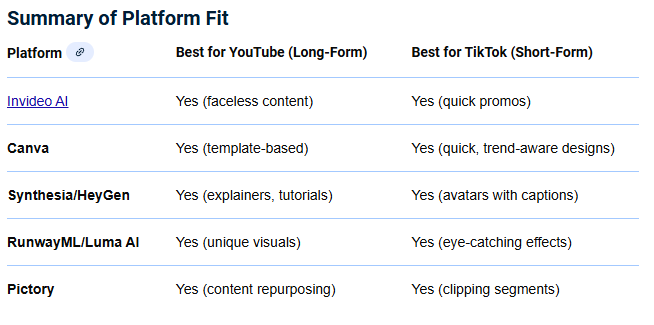
- InVideouser-friendly AI: This tool is great for making social media videos. I just describe the idea, and InVideo AI crafts a script, finds stock footage, generates a voiceover, adds background music, and creates captions. The platform is user-friendly, so even longer YouTube videos or quick TikToks come together fast. Real-time text-based editing lets me change scripts right in the editor, which is super helpful for faceless content.
- Canva: Canva stands out for its simple templates and AI-powered text-to-video generator. It’s a smart option for users who don’t want a steep learning curve. I like the range of templates for TikTok posts, YouTube thumbnails, and quick promos. Canva’s integrations with tools like Runway add even more creative options, so you can do advanced effects if you’re feeling ambitious.
- Pictory: Pictory has made turning blogs and podcasts into videos really straightforward. Paste the text or link, and it matches clips, images, and even adds branded styles and captions. I like using this when I have long-form content and want to clip out pieces for TikTok or Shorts. It saves hours compared to manual editing.
- Description: This platform changes video editing into something as simple as editing a Word document. I work with Descript by editing the transcript; delete a word, and it’s gone from the video. It also generates filler-word-free edits and lets me quickly rephrase sections. For YouTube commentary or tutorials, Descript’s workflow is among the fastest I’ve used.
Many creators, myself included, often mix and match these all-in-one platforms depending on the goals of each project. For example, I might start with a quick script using InVideo AI, add some custom graphics in Canva, and finish off with detailed edits in Descript to put together a unique YouTube upload or a slick TikTok short. The ease of jumping between these tools means you can experiment and find what works best for your style and audience.
Specialized Generative and Creative AI Video Tools
Some creators want more control over style, visuals, or even virtual presenters. These AI tools focus on those needs and give more advanced creative choices:
- RunwayML: Runway leads in creative AI video. I like the ability to tweak camera angles, props, and scenes using simple controls. If I’m developing a high-concept video or unique visual clips, Runway, especially with its latest models, gives tons of flexibility.
- Synthesia and HeyGen: Both platforms let me create videos with AI avatars that look and sound natural. Input a script, select a digital presenter, and the result is a polished “talking head” video. This is especially good for explainer videos, product intros, or any content where you want a host but prefer not to film yourself. Multilingual support and quick revisions make scaling content much easier.
- Luma AI Dream Machine and Google Veo: These are newer on the scene and focus on dynamic, high-quality clips. If I need original footage for brainstorming or creative backgrounds, both can produce clips from just a text prompt. They’re better for raw visual assets than for making full, structured videos right now.
Experimenting with specialized tools is also a great way to create content that stands out. Sometimes, combining assets from RunwayML with spoken avatar segments from Synthesia or HeyGen results in unique and memorable videos. These platforms are always innovating, so revisiting them every few months can reveal new features for improving your overall production quality.
AI Video Generators for TikTok and ShortForm Content
Going viral on TikTok or Instagram Reels depends on quick, engaging videos. AI tools that deliver fast results really shine here. Based on my work, I recommend:
- inVideo AI V3: Still one of my top choices for automated, faceless TikToks. Hand the tool a single prompt,t and it delivers a complete short, including a script, synthetic voiceover, stock footage, captions, and music. I just review, tweak, and post.
- CapCut (AI Features): CapCut is TikTok’s own editing app, and it keeps adding AI extras like autocaptions, script-based video generation, and background removal. For making and posting quick clips, it’s the most seamless on mobile.
- OpusClip and Munch: Both platforms help me repurpose YouTube videos into TikToks or Shorts. They use AI to spot “viral” moments, cropping and resizing footage into vertical clips, even adding captions automatically. This saves so much time when working with podcast or long-form content.
- Renderforest: I turn to Renderforest for trend-ready TikTok templates. Paste my script, and it automatically builds the scenes and transitions. Makes staying on top of social media trends easier for me.
If you want your videos to spread like wildfire, fast editing and trend-driven visuals are key. I suggest rotating between CapCut for its mobile speed and Renderforest for fresh templates, then using OpusClip or Munch when you want to quickly repurpose longer podcast or YouTube clips. This approach helps me keep my content pipeline full without burning out.
Best AI Video Generators for YouTube and Longer Videos
For YouTube, especially with educational or explainer content, you often want something more detailed or structured. Here’s what works for me:
- Pictory: Turning long blog posts or scripts into YouTube-ready videos is easy with Pictory. The platform matches text with relevant stock video, edits sections for flow, and includes branding. This makes it great for creators who want to turn written content into engaging video series.
- HeyGen and Synthesia: Both tools lead when it comes to “talking head” videos with AI avatars. I’ve made full tutorials without ever stepping in front of the camera. The lip-sync and facial expressions are quite realistic, which keeps the videos professional.
- Filmora (Audio-to-Video AI): Filmora’s AI feature can automatically sync video footage or visual effects to the beat of a voiceover or background music. It’s powerful for making music videos or dynamic presentations where timing with music matters.
When producing longer videos, I like combining the automated assembly of Pictory, the professionalism of Synthesia-driven avatars, and the timing sophistication of Filmora. This recipe lets me create thorough, on-brand YouTube series that hold up against much bigger productions.
Frequently Asked Questions About AI Video Generators
Here are some common questions I hear from fellow creators:
Can I use AI video generators for monetized YouTube channels?
Yes, many creators use AI-generated videos on monetized channels. Always double-check that you have the rights to any stock images or audio included by the AI tool.
Do AI video generators replace human creativity?
AI tools help save time and automate technical tasks, but your creative input, like choosing topics and reviewing edits, makes videos more engaging and unique.
Are there copyright risks?
Most reputable AI video generators offer licensed stock media, but I always check copyright guidelines and read the tool’s terms of service. For unique branding, it’s a good idea to add your own touches or use custom visuals.
Making Cinematic Clips and HyperRealistic Video with AI
If you’re aiming for high-end, cinematic YouTube intros or creative TikTok visuals, these AI video tools go beyond the basics:
- Sora 2: When I need short, movie-quality clips from a written idea, Sora 2 generates realistic footage that’s almost indistinguishable from actual video. I use it to storyboard ideas or add eye-catching moments to longer edits.
- Runway Gen4: For narrative projects where character consistency and advanced camera movement are important, Runway’s advanced models let me create scenes with more cinematic control than most tools offer.
- Google Veo 3: If my video involves character dialogue, interviews, or realistic vlogging scenes, Veo’s AI can generate selfie footage complete with subtle facial movement and natural speech.
- Kling AI: Kling is great when I need visual effects like realistic motion tracking or replacing objects in a shot for social media videos. It’s commonly used for high-impact, attention-grabbing TikToks.
With tools like Sora 2 and Runway Gen4, even solo creators can step up their content using techniques that were once out of reach. My advice is to experiment with these cinematic options for trailers, intros, or even just to spice up regular posts. Sometimes, a short, next-level cool effect is all you need to catch a viewer’s eye.
Points to Consider Before Choosing an AI Video Generator
Jumping into AI video creation is exciting, but picking the right tool depends on your goals and budget. From my own projects, here are a few things to think about:
- Ease of Use: Some platforms have a learning curve, while others are designed for quick results with no editing skills required.
- Customization: Decide how much creative control you want. Many AI generators deliver fast results with templates, but others let you tweak every detail.
- Voice and Language Options: If you want to reach a global audience, check for multilingual support and different voice styles in the AI avatars or narrators.
- Cost: Prices range from free with watermarks to expensive monthly plans. I’ve found it’s worth starting with free versions or trials to see what fits your workflow.
- Output Quality: Some tools focus on quick social clips, while others can deliver near-cinematic quality. Match the tool to your channel’s style and audience.
Ask yourself what matters most for the kind of videos you want to make. Start small, compare features, and don’t be afraid to mix in some variety by trying several options as you refine your process.
Tips for Getting More Out of AI Video Generators
After experimenting with many of these platforms, I recommend these habits for making the most of them:
Write Clear Prompts or Scripts: The better your input, the better your video. I always try to be specific about tone, topic, and visual style upfront.
Review and Edit AI Output: While AI is fast, it doesn’t always understand subtle context. I watch every generated video and tweak scripts, visuals, or music as needed to fit my channel’s voice.
Try Different Tools for Different Needs: Sometimes I use multiple platforms in a single project. For example, I generate a script with one app, create a video in another, and add an AI voiceover from a third.
Stay Up-to-Date: AI features spread like wildfire. I like to test updates and new releases to keep my production process fresh and efficient.
Pushing your creativity with these tips is the fastest way to set yourself apart and keep your workflow efficient. Be sure to ask for feedback and watch what’s trending so your videos stay relevant.
Wrapping up, AI video generators make it easy for anyone to build a creative online channel or simply boost their production quality. Don’t be afraid to experiment, keep your workflow fresh, and keep an eye out for the next wave of creative tools coming your way.
Check Out Our Most Recent Articles:
- Managing Multiple Social Media Platforms Efficiently

- Affordable Studio Lighting Kits To Level Up Your Video Content

- Optimizing Blog Posts For GEO To Boost Affiliate Revenue

- Profitable Full-Time Blogging with Diversified Income Streams

- Increasing Engagement To Boost Affiliate Marketing Income

- Scaling Content Production Without Increasing Costs

Wishing You Much Success in Growing Your TikTok Account,

- onlinebenjamins.com
- thebeachangler.com
- thesinnerinthemirror.com
- diyoutdoorsmen.com
- Facebook: Online Benjamins
- Twitter: @onlinebenjamin1
- Instagram: dotcomdinero
- YouTube: Online Benjamins
Rex
P.S. If you have any questions or are unsure of anything, I am here, and I promise I will get back to you on all of your questions and comments. Just leave them below in the comment section. Follow me on Twitter: @onlinebenjamin1, Instagram: dotcomdinero, and Facebook: Online Benjamins.


Hi,
Thanks for stopping by and congratulations for taking the first steps to building your own online business. I’ve been in business both offline and online since 1997. I would consider it an honor to help you build your business. Father of 3, life long outdoorsman with an education in Genetics and Economics. This site is about cutting through the BS and finding the real opportunities in the online world. I look forward to working with you.