
Trying to run several social media accounts without a system can leave anyone feeling stressed and disorganized. I’ve found that handling multiple platforms works best when I rely on routines and automation instead of jumping between apps all day. Whether I’m sharing tips, growing an audience, or planning to monetize, it all gets easier with a focused approach that keeps everything moving without taking over my time.
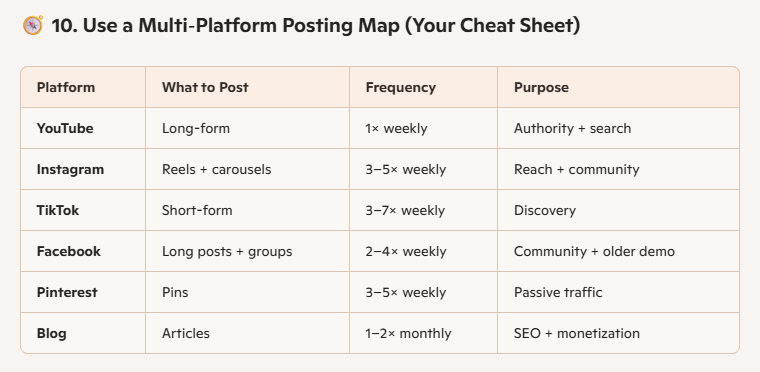
Not every platform will matter the same for your goals, and spreading yourself thin only slows progress. I like to pick one main platform for my best content. This is where I connect most with people or where I see the best growth. For example, I often choose Instagram if I’m sharing visuals, YouTube for super detailed guides, or TikTok if quick takes and short tips fit my style.
Other platforms like Facebook, X (Twitter), and Pinterest become extra places where I share shorter versions, highlights, or teasers linking back to my main work. This method saves a lot of time because it means every new piece of content starts in one place, and I don’t have to come up with separate ideas just for the sake of being everywhere.
Putting in the effort where results show up makes every post count more. Over time, I’ve noticed that this helps build a stronger connection with my main audience, and it becomes easier to track down what works and what doesn’t. If something goes viral on my primary platform, I simply adapt it to suit the tone and style of my secondary channels.
How I Plan My Week to Avoid Content Chaos
Juggling several accounts doesn’t need to mean creating new things every day. I find it easiest when I follow a weekly system. The centerpiece is one core idea, like a full YouTube video, detailed blog post, or a themed Instagram series.
Around that, I put together related short video clips, image quotes, or quick tips for Reels, TikTok, Facebook, and Stories. I also plan out one or two interactive posts; these could be polls, questions to the audience, or simple behind-the-scenes updates.
Batching these steps for the week keeps me from scrambling for daily posts and helps keep my content consistent across every platform. I often add an email newsletter as well, recapping the highlights and inviting subscribers to check out what’s new. Having this weekly rhythm makes it simpler to step up my content and spot patterns in audience engagement, too.
Multiply Your Content by Repurposing
Many think they need fresh ideas for every single platform, but my experience shows that turning one idea into multiple forms gets better results. If I film a how-to video for YouTube, I break that down into smaller clips for TikTok and Instagram Reels.
I use the main talking points as carousel posts or tweet threads. Summarizing those tips becomes a blog post, and pulling out a striking quote creates a shareable graphic. With this method, I’m not just sharing everywhere; I’m making sure each platform gets something that feels natural for its style.
Repurposing from one anchor piece reduces how often I run out of ideas and keeps my schedule practical. Plus, by breaking up and remixing content, you reach people who prefer different formats—videos, posts, or quick stories. If I respond to comments or questions from my audience, I sometimes turn those replies into new content ideas for the week.
Simplified Content Calendars That Work
A reliable content calendar cuts down on stress and makes my week much more predictable. I use basic tools like a Google Sheet or Notion page to outline each week. My columns usually have the platform, type of post (video, image, story), the status (like idea, filming, editing, scheduled), the publish date, and a link to where the asset is stored.
This helps me track progress without fancy software, and it’s easy to update if my plans change. Knowing exactly what’s next keeps everything from piling up and helps avoid accidental gaps in my posting streaks. If you prefer physical planners, you can even jot down your schedule on paper; it’s all about what feels less overwhelming and gets you to make the most of your time.
Batching Tasks for Less Distraction
Switching constantly between tasks kills productivity, so I set aside specific blocks of time to get similar things done at once. For example, I’ll script and film all my long-form content in one morning, then dedicate an afternoon to chopping those videos into shorter clips. I handle editing in another block and batch-write all my captions and hashtags in another. I finish by prescheduling as many posts as I can for the week.
This routine keeps my creativity sharp and prevents me from feeling burnt out. It also leaves more space for checking analytics, responding to comments, and finding new ideas without running behind. Batching even helps step up my overall content quality since I can focus deeply instead of being pulled in five directions all at once.
I rely on automation tools so I can focus on quality instead of posting at random hours. Social media schedulers like Meta Business Suite for Facebook and Instagram, YouTube Studio, and Buffer save me a lot of manual effort. For repurposing video content, I often use apps like Repurpose.io or OpusClip, which help quickly create short clips from my longer material.
Caption generators and AI writing assistants (like Notion AI or Jasper) help when I hit a creative wall, though I always edit to keep my own voice. Automation isn’t about cutting corners, but about making room for real engagement and creativity. Using these tools gives me more breathing space, especially during busy weeks when new projects come up. That way, my posts can go live at optimal times even if I’m offline.
Tracking What Actually Matters
Trying to watch every possible metric feels overwhelming. I’ve learned to stick with the data that tells me most about my real progress. If most of my content starts on YouTube, I watch things like average view duration and clickthrough rate. On Instagram and TikTok, I track saves, shares, follows, and any spikes in link clicks. For my blog or email list, I focus on new signups, open rates, and any product or affiliate sales.
This way, I know what’s working and what’s just soaking up energy. I make decisions based on these numbers, whether that’s doubling down on a post style, rethinking my content hooks, or switching up my posting schedule.
Regularly checking your top metrics also helps you set realistic goals and adjust your approach if something isn’t working. If engagement drops on one channel, I’ll dig into the numbers and experiment with timing, formats, or content topics to keep things improving.
Social media is always on, but I don’t need to be. I mute notifications, close all social apps outside of planned work times, and avoid checking comments unless I’ve set aside time to respond thoughtfully. I have designated content days and rest days, which helps keep my energy up and makes social posting feel more like an enjoyable practice and less like a chore.
Complete prescheduling means I don’t feel pressured to be online 24/7, and I remind myself I’m building value, not just chasing likes or replies. Protecting my time keeps me excited about creating instead of feeling trapped by endless scrolling. Taking regular breaks also means I’m able to come back with fresh ideas and a positive mood, which my audience always picks up on.
Here are answers to some questions I’ve been asked when helping others run several accounts at once.
How do I pick my main platform?
I choose the platform where my ideas fit best, and my intended audience already spends time. If most of my content is how-to videos, YouTube works well. For quick tips and community chatting, Facebook or Instagram might make more sense. I use analytics to see where my best results come from and focus there. Sometimes, it takes trial and error to spot where your content resonates deepest, so don’t be afraid to experiment and monitor progress.
What if I get stuck for content ideas?
When ideas dry up, I go back to what I’ve already created. I look for new ways to repackage or expand on those ideas, or I ask my audience what they want to see next. Feedback, trending questions, and reviewing old posts always get me back on track. Checking out what other creators in your space are doing can also give a boost to your brainstorming sessions, as long as you put your own spin on trends.
Are there risks in running multiple accounts?
Managing several accounts spreads my time thinner and increases the chances of mistakes, like posting the wrong thing or missing a comment. I double-check everything before posting and lean on scheduling tools to keep things organized. Having one main hub to anchor everything helps keep my brand and messaging steady. Setting alerts for important messages and periodically auditing each account helps ensure nothing slips through the cracks.
Relying only on social platforms is risky, since algorithms change or accounts can get restricted without warning. I always work to build pathways from my socials to something I control, like an email list, personal website, or digital store. I mention blog links in video descriptions, encourage email signups in posts, and offer freebies or exclusive guides that bring followers into my own space.
This means I keep connecting with people even if I post less or take breaks. It’s helped me monetize through affiliate sales, my own products, or sponsored campaigns, all while knowing my community can stay in touch wherever my content shows up. Building a system outside social platforms gives me extra security and more freedom in the long run.
Efficiently managing multiple social media platforms comes down to planning, smart automation, and knowing when to step away. With routines and the right tools, it gets easier to grow an audience without sacrificing your free time. The bottom line: a solid system does the heavy lifting, so you can create, connect, and enjoy the adventure.
Check Out Our Most Recent Articles:
- Managing Multiple Social Media Platforms Efficiently

- Affordable Studio Lighting Kits To Level Up Your Video Content

- Optimizing Blog Posts For GEO To Boost Affiliate Revenue

- Profitable Full-Time Blogging with Diversified Income Streams
- Increasing Engagement To Boost Affiliate Marketing Income

- Scaling Content Production Without Increasing Costs

Wishing You Much Success in Managing Your Social Media,
- onlinebenjamins.com
- thebeachangler.com
- thesinnerinthemirror.com
- diyoutdoorsmen.com
- Facebook: Online Benjamins
- Twitter: @onlinebenjamin1
- Instagram: dotcomdinero
- YouTube: Online Benjamins
Rex
P.S. If you have any questions or are unsure of anything, I am here, and I promise I will get back to you on all of your questions and comments. Just leave them below in the comment section. Follow me on Twitter: @onlinebenjamin1, Instagram: dotcomdinero, and Facebook: Online Benjamins.

Hi,
Thanks for stopping by and congratulations for taking the first steps to building your own online business. I’ve been in business both offline and online since 1997. I would consider it an honor to help you build your business. Father of 3, life long outdoorsman with an education in Genetics and Economics. This site is about cutting through the BS and finding the real opportunities in the online world. I look forward to working with you.